Difference between revisions of "Input Data Format/en"
(Importing a new version from external source) |
(Updating to match new version of source page) |
||
| (6 intermediate revisions by the same user not shown) | |||
| Line 2: | Line 2: | ||
| − | [[File: | + | [[File:Formatação dos dados+en-US.PNG|link=]] |
| Line 11: | Line 11: | ||
* '''Date mask''': Choose the [[Date]] fields mask in the file. The selected mask must be exactly equal to the format used by dates in the file. For CSV files only; | * '''Date mask''': Choose the [[Date]] fields mask in the file. The selected mask must be exactly equal to the format used by dates in the file. For CSV files only; | ||
| − | * '''Delimited by''': Specifies the columns delimiter character. Select between ''Tab'', '' | + | * '''Delimited by''': Specifies the columns delimiter character. Select between ''Tab'', ''Semicolon'', ''Collon'' or ''Another character'' (for ''Other'' type the desired delimiter in the field). Usually, the correct option is selected automatically. For CSV files only; |
| − | * '''Header''': Check if the file | + | * '''Header''': Check if the file has a ''Header row'' that identifies the columns. The header will be used as the default name for the columns in the datasource; |
* '''Decimal Separator''': Specifies the decimal separator used in the file. For CSV files only | * '''Decimal Separator''': Specifies the decimal separator used in the file. For CSV files only | ||
| Line 26: | Line 26: | ||
See [[Automatic Dashboard Generation]] for information on how to continue. | See [[Automatic Dashboard Generation]] for information on how to continue. | ||
| − | If you are [[Import/Update data|updating]] a | + | If you are [[Import/Update data|updating]] a datasource, go directly to the [[New Data Source Summary|import summary]]. |
Latest revision as of 02:29, 5 October 2022
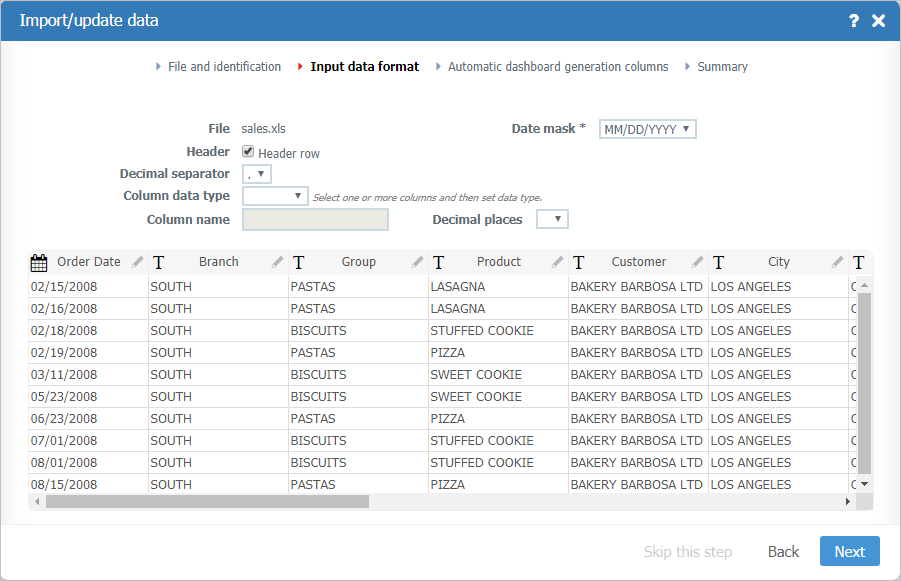
- Charset: Specifies the file charset. Usually, the correct option is automatically selected. For CSV files only;
- Start row: Specifies which row of the file the import process should start reading. Headings should be included if the Header row option is checked. For CSV files only;
- Date mask: Choose the Date fields mask in the file. The selected mask must be exactly equal to the format used by dates in the file. For CSV files only;
- Delimited by: Specifies the columns delimiter character. Select between Tab, Semicolon, Collon or Another character (for Other type the desired delimiter in the field). Usually, the correct option is selected automatically. For CSV files only;
- Header: Check if the file has a Header row that identifies the columns. The header will be used as the default name for the columns in the datasource;
- Decimal Separator: Specifies the decimal separator used in the file. For CSV files only
- Columns options: Click the column header in the preview table to select and change its options:
Click the Next button.
See Automatic Dashboard Generation for information on how to continue.
If you are updating a datasource, go directly to the import summary.
